
Containr - Modern Container Management Platform
🚧 Work in Progress - Not yet fully functional, this is the default structure
Deploy, manage, and scale containers with built-in Cloudflare tunnel support.
Quick Start
•
Features
•
Tech Stack
•
Documentation
•
Contributing
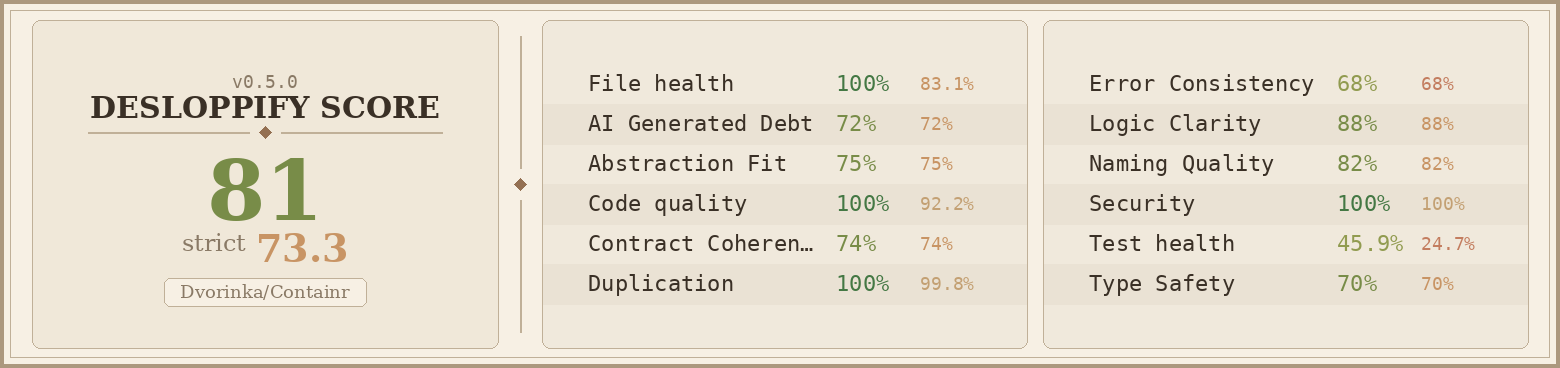
> **⚠️ Development Status**: This project is currently under active development and is **not yet ready for production use**. The current codebase represents the default structure and foundation for the container management platform. Many features are still being implemented and may not work as expected.
> **🚀 Inspired by Railway**: This project draws inspiration from [Railway](https://railway.app)'s seamless deployment experience and developer-friendly approach. The goal is to bring that same level of simplicity and power to self-hosted container management.
## Introduction
I built Containr because I was tired of complex container orchestration tools that required weeks of setup and deep expertise. You know how it is – Kubernetes clusters to configure, CI/CD pipelines to maintain, networking nightmares to debug, and that simple app deployment that somehow took three days to get running.
So I decided to build my own solution. Containr is basically the platform I wish I had – one place to deploy, manage, and scale containers without the complexity. It's open-source and self-hosted because I believe your infrastructure should belong to you, not some cloud provider.
It's like if Docker Compose, Traefik, and a modern dashboard had a baby. Built by one person (with AI's help), for anyone who's tired of container management being a mess.
### My Design Inspiration
I've always been a huge fan of **Portainer** – their clean, intuitive approach to container management just makes sense. Everything feels intentional and puts your containers first.
So yeah, Containr borrows heavily from that design philosophy. But I wrote every line of code from scratch – this isn't some fork or copy-paste job. I took that beautiful simplicity and tried to expand it into more of a comprehensive container platform with modern features.
### The AI-Assisted Journey
This project was built with **Windsurf SWE 1.5**.
Look, I'll be honest – I'm not the best DevOps engineer out there. But I really wanted to build something that solves real problems, and I think passion matters more than being perfect. Windsurf helped me figure out the hard stuff, learn new technologies, and actually build something I'm proud of.
As a solo dev, having an AI pair programmer made this whole thing possible. Go backend, React frontend, Docker orchestration – stuff I probably couldn't have tackled alone. It's pretty cool what you can create when humans and AI work together, even when you're still learning.
With Containr, your container deployments are centralized, scalable, and easy to manage, while remaining self-hosted so you maintain full control and privacy – just as it should be.
## Project Status
Containr is my labor of love – constantly evolving with core functionalities that I use every day. As a solo developer, I'm building this in the open, adding features based on real needs and feedback from fellow developers and DevOps engineers. The platform includes multiple services working together to create the container management hub I've always wanted.
Every feature you see is something I personally needed and use. Your feedback, bug reports, and feature ideas aren't just welcome – they're what help shape this tool into something that can help others manage their container infrastructure better too.
## Features
### Core Functionality
- **Container Management**: Deploy, start, stop, and restart containers with ease
- **Service Orchestration**: Manage multi-container applications with Docker Compose integration
- **Automatic SSL**: Built-in Let's Encrypt certificate management with Traefik
- **Cloudflare Tunnel**: Zero-config deployment with automatic public URLs
- **Web Dashboard**: Modern React-based interface for container management
- **Real-time Logs**: View and search container logs in real-time
### Advanced Features
- **Auto-scaling**: Automatic horizontal scaling based on resource metrics
- **Health Monitoring**: Comprehensive health checks and monitoring for all services
- **Resource Metrics**: CPU, memory, and network usage tracking
- **Preview Environments**: Automatic preview deployments for branches
- **Git Integration**: Connect repositories for automatic deployments
- **Environment Variables**: Secure management of application secrets and configuration
- **Database Management**: Built-in PostgreSQL and Redis with automated backups
- **Security Scanning**: Container vulnerability scanning and compliance reporting
### Deployment & Infrastructure
- **Multi-environment Support**: Development, staging, and production configurations
- **Load Balancing**: Intelligent traffic distribution with Traefik
- **Service Discovery**: Automatic service registration and discovery
- **Network Management**: Isolated networks and secure inter-service communication
- **Volume Management**: Persistent storage with automated backups
- **CI/CD Integration**: GitHub Actions and GitLab CI integration
### Security & Compliance
- **Authentication**: JWT-based authentication with OAuth2 support
- **Role-based Access Control**: Granular permissions for users and teams
- **Audit Logging**: Comprehensive audit trails for all actions
- **Data Encryption**: Encrypted storage for sensitive data
- **Security Scanning**: Automated vulnerability assessment
- **Compliance Reporting**: GDPR and SOC2 compliance frameworks
## Tech Stack
### Frontend
- **React + TypeScript** – Modern, reactive UI framework with type safety
- **Vite** – Fast build tool and development server with HMR
- **TailwindCSS** – Utility-first CSS framework for rapid UI development
- **@tanstack/react-query** – Powerful data fetching and state management
- **React Router** – Client-side routing for SPAs
- **@xyflow/react** – Interactive diagrams and visualizations
- **Recharts** – Beautiful charts and data visualization
- **Zustand** – Lightweight state management
### Backend Services
- **Main Backend (Go)** – Core API, container management, and business logic
- Gin web framework for HTTP routing
- GORM for database operations
- JWT authentication and authorization
- Docker SDK integration
- **Database Layer** – PostgreSQL for production data
- **Cache Layer** – Redis for session management and caching
- **Message Queue** – Background job processing
### Infrastructure & DevOps
- **Docker & Docker Compose** – Containerized deployment
- **Traefik** – Reverse proxy with automatic SSL
- **Cloudflare Tunnel** – Zero-config public exposure
- **PostgreSQL** – Primary database
- **Redis** – Caching and session storage
- **Nginx** – Static file serving
## Quick Start
### Prerequisites
- Docker and Docker Compose
- Git
### Installation with Docker (Recommended)
1. **Clone the repository**
```bash
git clone https://github.com/your-username/containr.git
cd containr
```
2. **Configure environment**
```bash
cp .env.example .env
# Edit .env with your configuration
```
3. **Start all services**
```bash
# Development mode with hot reload
./start-unified.sh dev
# Production mode (requires DOMAIN env var)
export DOMAIN=yourdomain.com
./start-unified.sh prod
# Production with Cloudflare tunnel (requires CLOUDFLARED_TOKEN)
export CLOUDFLARED_TOKEN=your_token_here
./start-unified.sh cloudflare
```
4. **Access the application**
- **Development**: http://localhost (Frontend), http://api.localhost (API), http://localhost:8080 (Traefik Dashboard)
- **Production**: https://your-domain.com, https://api.your-domain.com, https://traefik.your-domain.com
- **Cloudflare Tunnel**: Check your Cloudflare dashboard for tunnel URLs
### Management Commands
```bash
./start-unified.sh stop # Stop all services
./start-unified.sh logs # View logs
./start-unified.sh status # Check service status
./start-unified.sh clean # Clean up containers and volumes
./start-unified.sh help # Show all commands
```
## Development
### Project Structure
```
containr/
├── cmd/ # Application entry points
│ ├── server/ # Main server application
│ └── cli/ # CLI tool
├── internal/ # Private application code
│ ├── api/ # HTTP handlers
│ ├── config/ # Configuration
│ ├── database/ # Database operations
│ ├── docker/ # Docker integration
│ ├── middleware/ # HTTP middleware
│ ├── security/ # Security features
│ └── ... # Other internal packages
├── src/ # Frontend React application
├── docs/ # Documentation
├── migrations/ # Database migrations
├── docker-compose.yml # Multi-service orchestration
├── Dockerfile.backend # Backend Docker image
├── Dockerfile.frontend # Frontend Docker image
├── start-unified.sh # Startup script
└── README.md
```
### Local Development
```bash
# Backend
go mod download
go run cmd/server/main.go
# Frontend
npm install
npm run dev
```
## Documentation
Comprehensive documentation is available in the project:
- **[Cloudflare Setup](./CLOUDFLARE_SETUP.md)** – Cloudflare tunnel configuration
- **[Docker Setup](./DOCKER_SETUP.md)** – Docker deployment guide
- **[Autoscaling](./AUTOSCALING.md)** – Auto-scaling configuration
- **[Dashboard Guide](./dashboard.md)** – Dashboard usage guide
- **[API Documentation](./docs/api/openapi.yaml)** – REST API reference
## Configuration
### Environment Variables
Key configuration options in `.env`:
```bash
# Domain Configuration (optional if using Cloudflare)
DOMAIN=yourdomain.com
ACME_EMAIL=admin@yourdomain.com
# Database Configuration
POSTGRES_DB=containr
POSTGRES_USER=containr_user
POSTGRES_PASSWORD=your_secure_postgres_password
# Redis Configuration
REDIS_PASSWORD=your_secure_redis_password
# Application Configuration
JWT_SECRET=your_very_secure_jwt_secret_key_here
CORS_ALLOWED_ORIGINS=https://yourdomain.com,https://www.yourdomain.com
# Traefik Authentication (Basic Auth for dashboard)
TRAEFIK_AUTH=admin:$apr1$b8mh8c8v$KkR8hQZQZQZQZQZQZQZQZ/
# Cloudflare Tunnel (alternative to domain)
CLOUDFLARED_TOKEN=your_cloudflare_tunnel_token_here
# Optional: Custom Docker Registry
DOCKER_REGISTRY=your-registry.com
DOCKER_USERNAME=your_username
DOCKER_PASSWORD=your_password
# Optional: External Services
SENTRY_DSN=https://your-sentry-dsn
SLACK_WEBHOOK_URL=https://hooks.slack.com/services/your/webhook/url
# Development/Testing
ENVIRONMENT=development
DEBUG=true
```
## Contributing
Building Containr as a solo developer has been an incredible journey, but it's always better when we build together! Whether you're fixing a typo, adding a feature, or just sharing ideas – your contribution matters.
**Feel free to contribute and enhance it to your liking. Help me make this project successful!**
Every contribution, no matter how small, helps turn this solo dream into a community success story. Whether you're a seasoned developer or just starting out, your perspective and skills can help make Containr better for everyone.
Here's how you can join this adventure:
1. **Fork the repository** and make it your own
2. **Create a feature branch** (`git checkout -b feature/amazing-feature`)
3. **Commit your changes** (`git commit -m 'Add some amazing feature'`)
4. **Push to the branch** (`git push origin feature/amazing-feature`)
5. **Open a Pull Request** – I'll be excited to review it!
### Development Guidelines
- Follow Go coding standards for backend development
- Use TypeScript for frontend development
- Write tests for new features (helps future you!)
- Update documentation as needed
- Remember: this is a labor of love, so let's keep it fun and welcoming
Don't hesitate to reach out if you're new to contributing – we all started somewhere, and I'm happy to help you get started!
## License
This project is licensed under the MIT License - see the [LICENSE](LICENSE) file for details.
## Community & Support
- **Issues**: Use GitHub Issues for bug reports and feature requests
- **Discussions**: Use GitHub Discussions for questions and community support
- **Documentation**: Check the project files for comprehensive guides
## Acknowledgements
### Inspiration
- **[Portainer](https://www.portainer.io/)** – Container management UI inspiration
- **[Docker Compose](https://docs.docker.com/compose/)** – Service orchestration concepts
- **[Traefik](https://traefik.io/)** – Reverse proxy and load balancing
- **[Cloudflare Tunnel](https://www.cloudflare.com/products/tunnel/)** – Zero-config deployment
### Technology Stack
This project is built with amazing open-source technologies:
- **Frontend**: React, TypeScript, Vite, TailwindCSS
- **Backend**: Go, Gin, GORM, PostgreSQL
- **Infrastructure**: Docker, Traefik, Cloudflare, Redis
## A Personal Note
Thank you for taking the time to look at my project. Containr represents months of learning, building, and dreaming – all in the service of creating something that makes container management a little more accessible and a lot more powerful.
In a world of complex orchestration tools and expensive cloud services, I believe there's beauty in owning your infrastructure. Containr is my attempt to build that bridge between simplicity and power.
Whether you use it, contribute to it, or just find inspiration here – know that you're part of something special. A solo developer's dream, powered by AI assistance, and shared with the open-source community.
---
**Containr** – Built with ❤️ by one human, one AI, and a passion for better container management.